
- Каталог оборудования Siemens
- Каталог продуктов Siemens Industry
- Приводная техника
- Техника автоматизации
- Системы автоматизации
- Системы визуализации SIMATIC HMI
- Системы идентификации
- Промышленные коммуникации SIMATIC NET
- Промышленные аппараты управления SIRIUS
- Промышленные информационные технологии
- Управление на базе РС
- Системы управления процессом
- Контрольно-измерительные приборы
- Измерительные преобразователи для давления
- Приборы измерения температуры SITRANS T
- Расходомеры
- Уровнемеры
- Позиционеры
- Устройство для защиты и пуска двигателей SIMOCODE-DP
- Сигнализаторы сбоев в промышленном процессе
- Аппаратные ПИД-регуляторы SIPART
- Встраиваемые самописцы и индикаторы
- Технологии взвешивания
- Дополнительные компоненты
- Коммуникации и программное обеспечение
- Directives
- Анализаторы процесса
- Блоки питания SITOP
- Продукты для специальных требований
- Energy
- Автоматизация и безопасность зданий
- Низковольтная коммутационная техника
- Технология безопасности
- Системные решения и продукты для отраслей
- Сервис
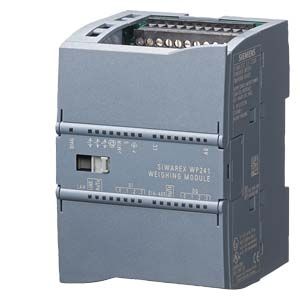
SIWAREX WP241
- Заказные данные (2)
- Аксессуары (9)
- Информационные материалы
Информационные материалы
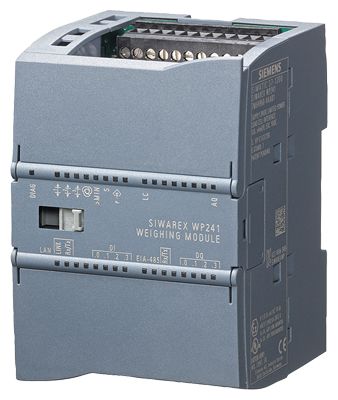
SIWAREX WP241
SIWAREX WP241 is a flexible weighing module for belt scales. The compact module is easy to install in the SIMATIC S7-1200 automation system. It can also be operated as a standalone module, i.e. without a SIMATIC CPU.
Область применения
SIWAREX WP241 is the optimal solution wherever belt scales are used that demand high accuracy, high user-friendliness, and flexible system integration. The typical applications of the SIWAREX WP241 are determining the current material flow rate, belt load and belt speed. Furthermore, 6 totalizers are available for evaluating the amount of material conveyed.
Дизайн
SIWAREX WP241 is a compact technology module in the SIMATIC S7-1200, and it allows direct connection to S7-1200 components via a sliding connector. Thanks to standard rail mounting, the installation and wiring outlay for the 70 mm-wide (2.76 inch) weighing module are very low.
The power supply, load cells, RS 485, digital input/outputs, and analog output are connected via the screw connector of the weighing module. An RJ45 connector is used for the Ethernet connection.Функции
The primary task of the SIWAREX WP241 is to measure the speed of the belt, to measure and convert the sensor voltage to a weight value, and to precisely calculate the amount of material conveyed or material flow rate.
The volume of material conveyed can be recorded in 6 totalization memories: The accumulated totalization memory determines the conveyed material over the entire operating time of the scale (can only be reset by loading the factory settings). The overall total and the four remaining totalization memories are available for use as required. e.g. for recording the daily or weekly totals.
Four different options are available for rapid commissioning:- Automatic calibration
The calibration is calculated automatically using the load cell parameters entered. Only the zero point has to be calculated on the actual plant. - Calibration with calibration weights or test weights
Test weights are secured to the weighing equipment and the conveyor belt is started. The calibration values are calculated while the belt is running. The zero point must also be calculated. - Calibration with test chain
Instead of test weights, a chain of a known weight can be placed on the measuring points of the belt. The calibration values are calculated as for calibration with test weights. - Calibration via material test
This method can be used if a volume of material is available, but neither test weights nor a chain are available. The material can either be preweighed or weighed afterwards. The material is passed over the belt scale, and the weighing module calculates the calibration characteristic automatically.
If "Automatic set to zero" is active, the electronic weighing system automatically executes a "set to zero" procedure when the belt reaches the "set to zero" area.
Extensive diagnostics functions are available. Diagnostic messages are output to the different interfaces. In simulation mode, both the speed and the belt load can be specified by the user, i.e. simulated. This makes it possible to test many functions in advance without operating belt scales. The digital inputs/outputs and the analog output can also be simulated for testing purposes. The "Trace" function is very helpful for optimizing the plant or when troubleshooting. This records the weighing history stored in the internal module memory (e.g. material flow rate, belt load, speed) and exports it to Excel in a graphical format.
Monitoring of the scale signals and states
The SIWAREX WP241 monitors the belt load, the material flow rate, and the belt speed, and it signals if the limits are exceeded. The respective limits can be parameterized as required.
Consistent and uniform communication between all system components enables fast, reliable and cost-effective integration and diagnosis in industrial processes.
Integration in the plant environment
SIWAREX WP241 can be directly integrated into the SIMATIC S7-1200 via the SIMATIC bus. Standalone operation without SIMATIC is also possible.
A wide variety of connection options are provided via the RS 485 and Ethernet interface. Via Modbus TCP/IP or Modbus RTU, control panels can be connected and it is also possible to communicate with various automation systems. A PC for programming the SIWAREX WP241 via SIWATOOL can be connected to the Ethernet interface.
SIWAREX WP241 can be integrated into the system software using all standard PLC programming languages from the TIA Portal. In contrast to serially linked electronic weighing systems, SIWAREX WP241 does not need costly additional modules to link it to SIMATIC.
Used in conjunction with SIWAREX WP241, it is possible to configure freely programmable, modular weighing systems in SIMATIC, which can be adapted to company-specific requirements as needed.

SIWAREX WP241 "Ready for use"
In addition to the configuration package, fully-featured SIWAREX WP241 "Ready for use" software is also available free-of-charge. It shows beginners how to integrate the module in a STEP 7 program and offers a basis for application programming. This allows you to connect the scale either directly to the SIMATIC CPU or to an operator panel connected directly to the SIWAREX WP241.
Software
There is also the option of using a Windows PC for commissioning and servicing. The program SIWATOOL enables the belt scales to be set without prior knowledge of the automation system, as required. During servicing, the technician can use a PC to quickly and simply analyze and test the procedures in the scale.
The following are just some of the tasks that can be carried out using SIWATOOL V7:- Parameterization and calibration of the scale
- Testing/Simulation of scale properties
- Recording, analysis and export of scale traces ("Trace")
- Creation of backup files for rapidly replacing modules without calibration

SIWAREX WP241 SIWATOOL
It is also extremely helpful to analyze the diagnostics buffer which can be saved together with the parameters following reading out from the module.
Trace mode is provided to optimize the weighing sequences in the SIWAREX WP241 weighing module. The recorded weight values and associated states can be displayed as trends using SIWATOOL V7 and MS Excel.Upgrading firmware
An additional program function can be used to download a new firmware version onto the SIWAREX WP241 on site. This means that firmware upgrades can be carried out on site as required anywhere in the world.
Особенности
SIWAREX WP241 offers the following key advantages:
- Uniform design technology and consistent communication in SIMATIC S7-1200
- Uniform configuration with TIA Portal
- Operation without SIMATIC CPU possible
- Direct connection of an operator panel via Ethernet
- Four digital inputs and outputs, one analog output
- Measurement of weight with a high resolution of ±4 million parts
- Simple adjustment of belt scales using the SIWATOOL V7 program via the Ethernet interface - even without knowledge of SIMATIC
- Replacement of module possible without renewed calibration of the scale
- Use in hazardous area zone 2
- Different calibration methods: With test weights, test chain, automatically or via material batch.
- Specification of belt inclination angle
- 6 totalization memories
- Simulation of speed and belt load for test purposes
- Comprehensive diagnostics functions
Технические данные
SIWAREX WP241
Integration in automation systems
S7-1200
SIMATIC S7-1200 system bus
Operator panel and/or automation systems from other vendors
Via Ethernet (Modbus TCP/IP) or
RS 485 (Modbus RTU)Communication interfaces
- SIMATIC S7-1200 backplane bus
- RS 485 (Modbus RTU)
- Ethernet (SIWATOOL V7, Modbus TCP/IP)
- Analog output 0/4 - 20 mA
- 4 x digital outputs, 24 V DC floating, short-circuit proof
- 4 x digital outputs, 24 V DC, floating
Commissioning options
- Using SIWATOOL V7
- Using function block in SIMATIC S7-1200 CPU / Touch Panel
- Using Modbus TCP/IP
- Using Modbus RTU
Measuring accuracy
Error limit according to DIN 1319-1 of full-scale value at 20 °C ± 10 K (68 °F ± 10 K)
0.05%
Internal resolution
up to ±4 million parts
Measuring frequency
100 / 120 Hz
Digital filter
Separate, variable adjustable low-pass and average filter for loading and speed
Filter for conveyor load
Low-pass filter (limit frequency 0.05 ... 50 Hz)
Filter for belt speed
Low-pass filter (limit frequency 0.05 ... 50 Hz)
Weighing functions
Readout data
- Weight
- Belt load
- Material flow rate
- Accumulated total
- Main total
- Free totals 1 … 4
- Belt speed
Limits (min/max)
- Belt load
- Material flow rate
- Belt speed
Load cells
Full-bridge strain gauges in 4-wire or 6-wire system
Load cell excitation
Supply voltage (regulated via feedback)
4.85 V DC
Permissible load resistance
- RLmin
> 40 Ω
- RLmax
< 4100 Ω
With SIWAREX IS Ex interface
- RLmin
> 50 Ω
- RLmax
< 4100 Ω
Load cell characteristic
1 … 4 mV/V
Permissible measurement signal range
-21.3 ... +21.3 mV
Max. distance of load cells
500 m (229.66 ft)
Connection to load cells in Ex zone 1
Optionally via SIWAREX IS Ex interface (compatibility of the load cells must be checked)
Approvals/certificates
- ATEX Zone 2
- UL
- EAC
- KCC
- RCM
Auxiliary power supply
Rated voltage
24 V DC
Max. power consumption
200 mA
Max. power consumption SIMATIC Bus
3 mA
IP degree of protection to DIN EN 60529; IEC 60529
IP20
Climatic requirements
Tmin (IND) ... Tmax (IND) (operating temperature)Vertical installation
-10 ... +40 °C (14 ... 104 °F)
Horizontal installation
-10 ... +55 °C (14 ... 131 °F)
EMC requirements according to
EN 45501
Dimensions
70 x 75 x 100 mm (2.76 x 2.95 x 3.94 inches)
- Automatic calibration